
You can easily reset your phone PIN by following the below steps:
- Click the Gear icon on the left side of the navigation panel to bring you to your Account Settings

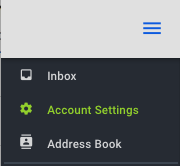
- Click the three dots in the upper right hand corner within the blue bar

- Choose ‘Change Pin’

- Enter your Login Password - this is the password used to login to the website
- Enter the new PIN
- Confirm the new PIN
- Click 'Reset Pin' button to complete the change

Comments
0 comments
Article is closed for comments.